mirror of
https://github.com/kevin-DL/vue-audio-recorder.git
synced 2026-07-08 08:45:19 +00:00


vue-audio-recorder
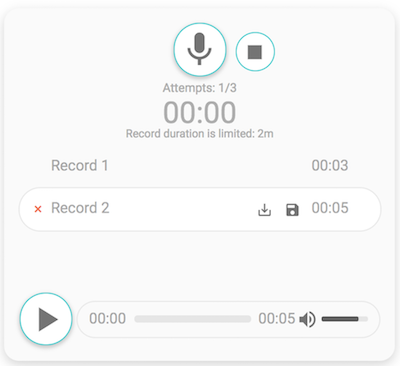
Audio recorder for Vue.js. It allows to create, play, download and store records on a server.
Live demo
Features
- Beautiful clean UI
- Download/upload/play record
- Time limit
- Records limit
- A lot of callbacks
- Individual an audio player
- MP3/WAV support
Tested in (desktop)
- Chrome
- Firefox
- Safari
Installation
npm i vue-audio-recorder --save
AudioRecorder props
| Prop | Type | Description |
|---|---|---|
| attempts | Number | Number of recording attempts |
| headers | Object | HTTP headers |
| time | Number | Time limit for the record (minutes) |
| bit-rate | Number | Default: 128 (only for MP3) |
| sample-rate | Number | Default: 44100 |
| filename | String | Download/Upload filename |
| format | String | WAV/MP3. Default: mp3 |
| upload-url | String | URL for uploading |
| show-download-button | Boolean | If it is true show a download button. Default: true |
| show-upload-button | Boolean | If it is true show an upload button. Default: true |
| show-custom-button | Boolean | If true show another button linked to specific action. Default: true |
| before-upload | Function | Callback fires before uploading |
| successful-upload | Function | Callback fires after successful uploading |
| failed-upload | Function | Callback fires after failure uploading |
| mic-failed | Function | Callback fires if your microphone doesn't work |
| before-recording | Function | Callback fires after click the record button |
| pause-recording | Function | Callback fires after pause recording |
| after-recording | Function | Callback fires after click the stop button or exceeding the time limit |
| select-record | Function | Callback fires after choise a record. Returns the record |
| custom-callback | Function | Callback fires when clicking on the custom button |
AudioPlayer props
| Prop | Type | Description |
|---|---|---|
| src | String | Specifies the URL of the audio file |
Usage
    import AudioRecorder from 'vue-audio-recorder'

    Vue.use(AudioRecorder)
    methods: {
      callback (data) {
        console.debug(data)
      }
    }
  <audio-recorder
    upload-url="YOUR_API_URL"
    :attempts="3"
    :time="2"
    :headers="headers"
    :before-recording="callback"
    :pause-recording="callback"
    :after-recording="callback"
    :select-record="callback"
    :before-upload="callback"
    :successful-upload="callback"
    :failed-upload="callback"/>
<audio-player src="/demo/example.mp3"/>
Build Setup
# install dependencies
npm install

# serve with hot reload at localhost:8080
npm run dev

# build for production with minification
npm run build
TODO
- Clear record list
- Responsive design
Authors
Gennady Grishkovtsov - Developer
Olga Zimina - UIX Designer