mirror of
https://github.com/kevin-DL/vue-audio-recorder.git
synced 2026-01-11 19:04:28 +00:00

106 lines
3.3 KiB
Markdown
106 lines
3.3 KiB
Markdown
# vue-audio-recorder
|
|
|
|
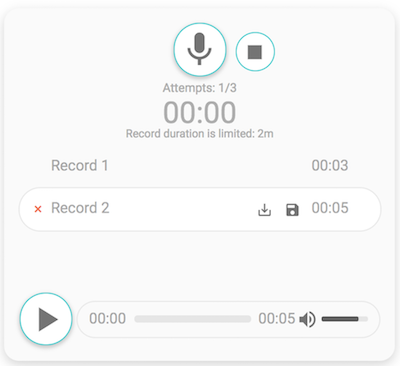
> Audio recorder for Vue.js. It allows to create, play, download and store records on a server.
|
|
|
|
#### [Live demo](https://jsfiddle.net/grishkovelli/rb1anxyj/)
|
|
|
|
|
|
|
|
### Features
|
|
|
|
- Beautiful clean UI
|
|
- Download/upload/play record
|
|
- Time limit
|
|
- Records limit
|
|
- A lot of callbacks
|
|
- Individual an audio player
|
|
|
|
### Tested in
|
|
|
|
- Chrome
|
|
- Firefox
|
|
- Safari
|
|
|
|
## Installation
|
|
|
|
```
|
|
npm i vue-audio-recorder --save
|
|
```
|
|
|
|
## AudioRecorder props
|
|
|
|
| Prop | Type | Description |
|
|
| --------------------- | -------- | --------------------------------------------------------------- |
|
|
| attempts | Number | Number of recording attempts |
|
|
| compact | Boolean | Hide the download and upload buttons |
|
|
| time | Number | Time limit for the record (minutes) |
|
|
| upload-url | String | URL for uploading |
|
|
| start-record | Function | Fires after click the record button |
|
|
| stop-record | Function | Fires after click the stop button or exceeding the time limit |
|
|
| start-upload | Function | Fires after start uploading |
|
|
| attempts-limit | Function | Fires after exceeding the attempts |
|
|
| failed-upload | Function | Fires after a failure uploading |
|
|
| mic-failed | Function | Fires if your microphone doesn't work |
|
|
| successful-upload | Function | Fires after a successful uploading |
|
|
| successful-upload-msg | String | Displays the message after a successful uploading |
|
|
| failed-upload-msg | String | Displays the message after a failure uploading |
|
|
|
|
## AudioPlayer props
|
|
| Prop | Type | Description |
|
|
| --------------------- | -------- | --------------------------------------------------------------- |
|
|
| src | String | Specifies the URL of the audio file |
|
|
|
|
## Usage
|
|
|
|
The most common use case is to register the component globally
|
|
|
|
```js
|
|
import {AudioRecorder, AudioPlayer} from 'vue-audio-recorder'
|
|
|
|
Vue.component(AudioPlayer)
|
|
Vue.component(AudioRecorder)
|
|
```
|
|
|
|
Alternatively you can do this to register the components
|
|
|
|
```js
|
|
import AudioRecorder from 'vue-audio-recorder'
|
|
|
|
Vue.use(AudioRecorder)
|
|
```
|
|
|
|
```html
|
|
<audio-recorder
|
|
upload-url="YOUR_API_URL"
|
|
:attempts="3"
|
|
:time="2"
|
|
:start-record="callback"
|
|
:stop-record="callback"
|
|
:start-upload="callback"
|
|
:successful-upload="callback"
|
|
:failed-upload="callback"/>
|
|
```
|
|
|
|
```html
|
|
<audio-player src="/demo/example.mp3"/>
|
|
```
|
|
|
|
## Build Setup
|
|
|
|
``` bash
|
|
# install dependencies
|
|
npm install
|
|
|
|
# serve with hot reload at localhost:8080
|
|
npm run dev
|
|
|
|
# build for production with minification
|
|
npm run build
|
|
```
|
|
|
|
## Authors
|
|
|
|
[Gennady Grishkovtsov](https://www.linkedin.com/in/grishkovtsov/) - Developer
|
|
|
|
[Olga Zimina](https://www.behance.net/zimin4ik) - UIX Designer
|